

Prepared Roles for Download
You can download and install prepared roles for SAP BW and SAP HANA. For SAP BO and SAC you must create the roles manually, following the documentation below.
-
Download the role
-
Install the roles in the target system
-
Apply the roles to the user that is used for synchronization
Downloads
SAP BW synchronization role:
SAP BW Roles for Sync.zip
SAP HANA synchronization role:
SAP HANA Role for Sync.tgz
Documentation
SAP BW
For each connected SAP BW system, a user must be stored in the Enterprise Glossary. This user is used to access the required metadata.
This requires the user to have the necessary permissions:
-
AAAB - Cross-application Authorization Objects
S_RFC - Authorization Check for RFC Access [T-B274010500]
|
Authorizations field |
Values |
|
ACTVT |
16 Execute |
|
RFC_NAME |
BDL_GET_GREENWICH_TIME, BDL5, DDIF_FIELDINFO_GET, RFC_FUNCTION_SEARCH, RFC_GET_FUNCTION_INTERFACE, RFC_PING, RFC_READ_TABLE, RFC1, RFCPING, RFC_SYSTEM_INFO, SDTX, SYST, <chosen prefix>RFC_GET_STRING, <name of function group for RFC_GET_STRING> |
|
RFC_TYPE |
FUGR, FUNC |
S_TCODE - Transaction Code Check at Transaction Start [T-B274010500]
|
Authorizations field |
Values |
|
TCD |
SE16, SE37 |
-
BC_A - Basis: Administration
S_TABU_DIS - Table Maintenance (using standard tools such as SM30) [T-B274010500]
|
Authorizations field |
Values |
|
ACTVT |
03 |
|
DICBERCLS |
BIDP, BWC |
S_TABU_NAM - Table Access by Generic Standard Tools [T-B294000100]
|
Authorizations field |
Values |
|
ACTVT |
DD03L, DD07T, RSAOOBJ, RSAOOBJT, RSAOOBJXREF, RSDATRNAV, RSDATRNAVT, RSDBCHATR, RSDCHA, RSDCUBE, RSDCUBET,, RSDIOBJT, RSDKYF, RSDTIM, RSDUNI,, RSFBP, RSFBPT,, RSOADSOT, RSOHCPR, RSOHCPRT, RSRWBINDEX, RSRWBINDEXT, RSZCALC, RSZELTATTR, RSOOBJXREF, RSOOBJXREF_HANA, RSRWORKBOOK, RSRREPDIR, RSZELTDIR, RSZELTPROP, RSZELTTXT, RSZELTXREF, RSZGLOBV, RVIFBPA, RSZRANGE, RSZSELECT, T002, T006A, TADIR, V_CMP_JOIN, RSAABAP, RSBOHDEST, RSBOHDESTT, RSBOHFIELDS, RSBOHFIELDST, RSDBCHATRXXL, RSDCUBEMULTI, RSDIOBJCMP, RSDODSO, RSDODSOT, RSDS, RSDSSEGFD, RSDSSEGFDT, RSDST, RSFBPFIELD, RSFBPFIELDT, RSFBPNAVATR, RSFBPNAVATRT, RSFBPSEMANTICS, RSFBPSOURCE, RSFOBUEV001, RSKSFIELDNEW, RSKSFIELDNEWT, RSKSNEW, RSKSNEWT, RSPLS_ALVL, RSPLS_ALVLT, RSPLS_ALVL_IOBJ, RSQISET, RSQISETT, RSQTOBJ, RSTRAN, RSTRANFIELD, RSTRANRULE, RSTRANRULET, RSTRANSTEPADSO, RSTRANSTEPCNST, RSTRANSTEPMASTER, RSTRANSTEPROUT, RSTRANSTEPSCRIPT, RSTRANT, RSZCOMPDIR, SEOCLASSDF, TCESYST, TMDIR, TRDIR, V_ELTDIR_TXT, V_REP_JOIN |
SAP BO
General
View Objects on Root Folder
Additional: View Objects on each folder down the folder hierarchy, that should be visible (similar to BI Launchpad)
WebI Reports
View Objects on Web Intelligence Documents
Design Studio Reports
View Objects on Design Studio Applications
Analysis for Office Workbooks
View Objects on Analysis for Office Workbooks
Lumira 2.x Documents
View Objects on Lumira Documents 3.2
WebI Reports
View Objects on Web Intelligence Documents
View Objects on underlying connection (for displaying Query Name (for BEx; System Connection))
View SQL on Web Intelligence Documents (for Query Script and Where-Used Information)
Design Studio Reports
View Objects on Design Studio Applications
Analysis for Office Workbooks
View Objects on Analysis for Office Workbooks
Lumira 2.x Documents
View Objects on Lumira Documents
SAC
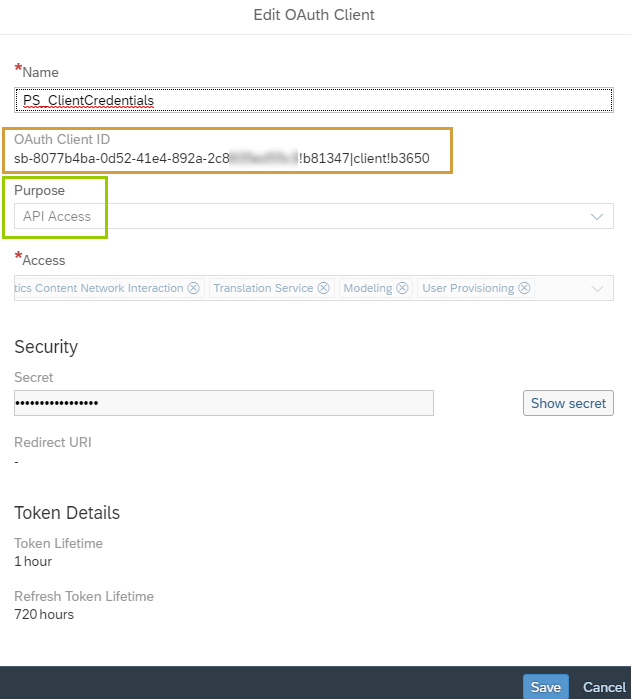
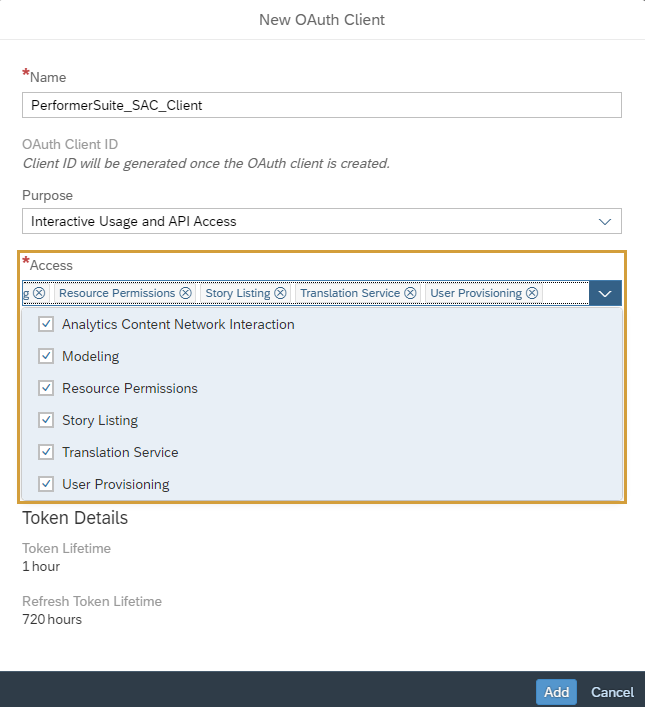
To access the SAC system, an OAuth client has to be created in your SAC.
Your SAC > System > Administration > App Integration > Add a New OAuth Client
Create an OAuth Client with the purpose "Interactive Usage & API Access" (Client Credential Grant) to have a “machine-to-machine” authorization. For access, enable all 6 checkboxes.
Learn more: SAP blog article
SAP HANA
Create the following role and assign it to the user that is used for synchronization:
role EnterpriseGlossary::EnterpriseGlossaryHanaRole {
system privilege: CATALOG READ;
catalog sql object "_SYS_BI"."BIMC_ALL_CUBES": SELECT;
catalog sql object "PUBLIC"."OBJECT_DEPENDENCIES": SELECT;
catalog sql object "PUBLIC"."VIEW_COLUMNS": SELECT;
catalog sql object "_SYS_BI"."BIMC_PROPERTIES": SELECT;
}