

In the Enterprise Glossary, entities can be labeled as Data Products. This allows organizations to restrict certain user groups to the catalog entries that are relevant and valuable to them from a business perspective.
Labeling an Entity as a Data Product
The Data Product label can be assigned to an entity in Edit mode:
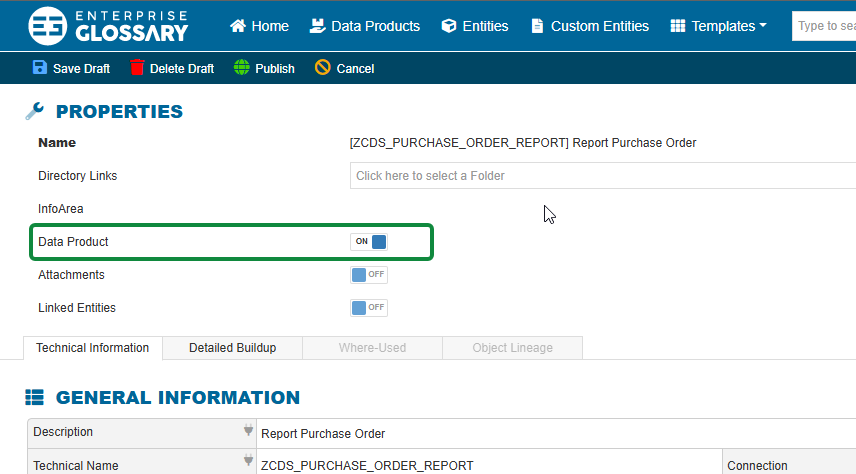
Only users with an Author role can label Entities as Data Products!
Once an entity is labeled as a Data Product, the following icon indicates its status:

Bulk labeling of entities as Data Products is already planned for a future release.
All entities labeled as Data Products are displayed in the Data Products section.
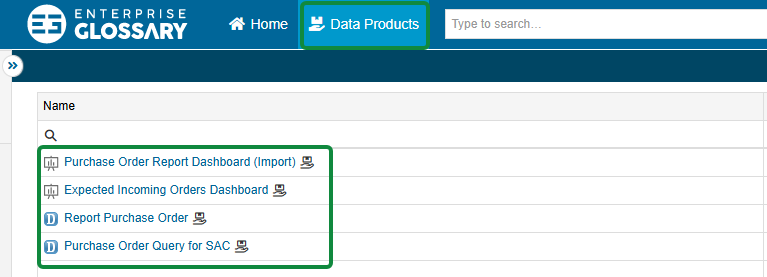
Custom Entities can also be labeled as Data Products.
Data Product Role
When the Default Data Product Role is assigned to a user, their access to the Enterprise Glossary is restricted to Data Products.
Users with this role can only access entities that are labeled as Data Products. The Data Products menu is the only available menu for these users.
The search is also automatically restricted to Data Products. Search results only include entities that have been labeled as Data Products.

Users with the Data Product role cannot directly access entities that are not labeled as Data Products.
However, related or dependent objects can still be accessed in the context of a Data Product, even if these objects are not themselves labeled as Data Products.
For example, if a user opens a CDS View that is labeled as a Data Product, they can also view its fields and access related entities, such as objects displayed in the Object Lineage. These related entities can be opened and viewed even if they are not labeled as Data Products.
For more information about the role settings for Data Products, see Roles and Permissions.